
API and API Keys
The web interface talks to a set of JSON endpoints under /api. With an API key you can call the same endpoints from scripts, CI pipelines and workflow tools such as n8n, without a browser session.
Create a key
- Sign in and open the Configuration page, then the Authentication tab.
- In the API Keys card click Create key, give it a name that tells you where it is used, and pick an expiry (never, 30 days, 90 days or a year) and an access level (full access or read only).
- Copy the key. It is shown once; afterwards only its first characters are visible in the list.
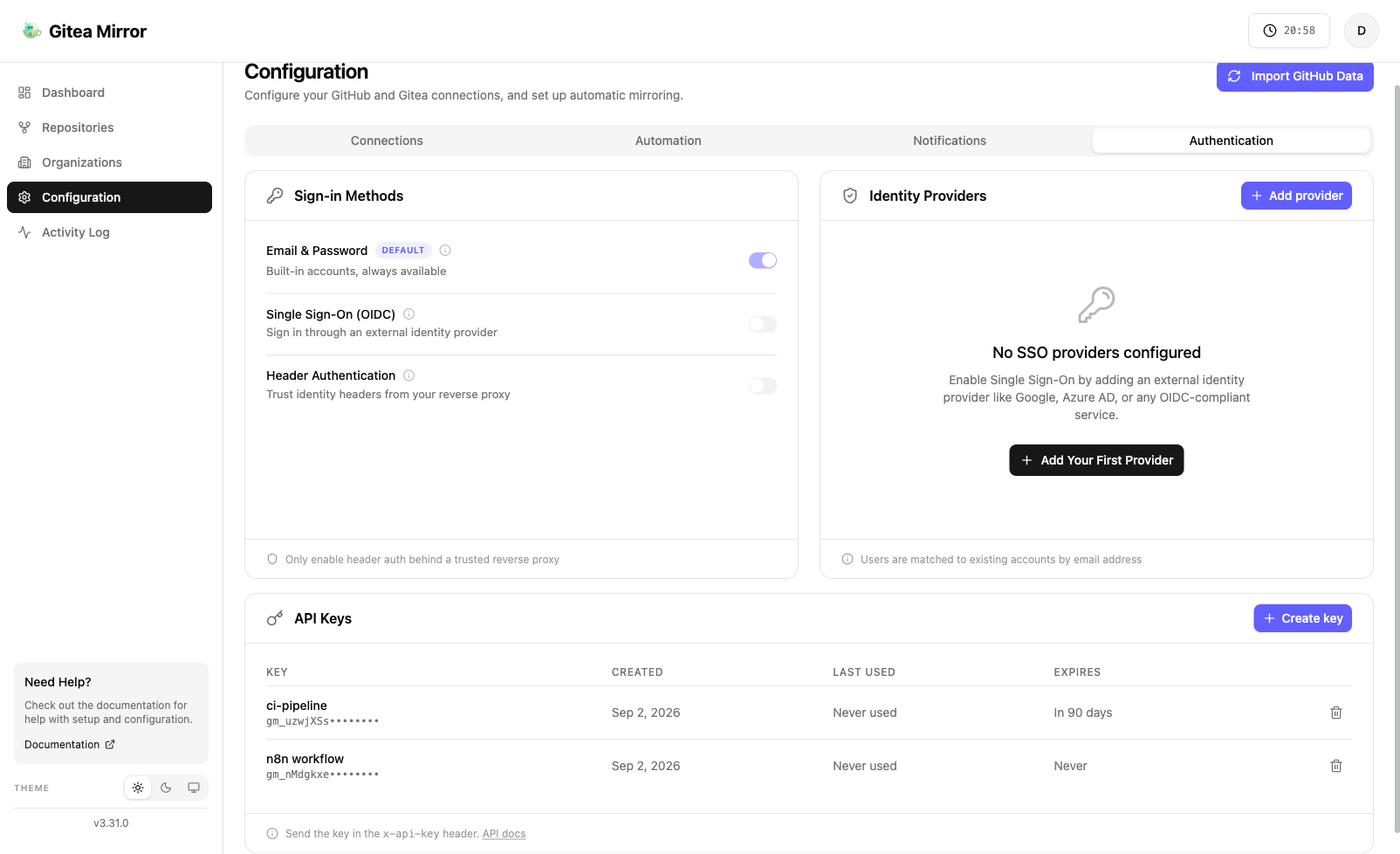
Keys start with gm_ and belong to the user who created them. A full access key carries the same rights as that user’s session. Revoke a key from the same list at any time. Keys are stored hashed. They are not rate limited by the app, so a runaway script is stopped by revoking its key.
Pick Read only under Access for a key that only needs to look: it can call every GET endpoint and nothing else. Any POST, PUT, PATCH or DELETE with a read only key gets 403:
{ "success": false, "error": "This API key is read only. Use a key with full access to make changes.", "code": "API_KEY_READ_ONLY" }Use a read only key for dashboards, monitoring and the MCP server when you only want an assistant to answer questions. A key’s access level cannot be changed after it is created; create a new key instead.
Send the key
Put the key in the x-api-key header. Every endpoint that accepts a session cookie accepts the header instead.
curl -sS "https://mirror.example.com/api/github/repositories" \
  -H "x-api-key: gm_..."
A missing, malformed, expired or revoked key gets 401 Unauthorized:
{ "success": false, "error": "Unauthorized" }Send Content-Type: application/json on every POST, PUT, PATCH and DELETE, also when the call has no body. Without it a script gets 403 with Cross-site POST form submissions are forbidden: the app’s protection against cross-site form posts treats a write with no content type, or a form content type, as a form unless its Origin header matches the app. curl’s -d sends a form content type unless you set the header.
A path or method that has no endpoint answers 404 with a JSON body naming both, so it reads differently from a 404 for an id or name that was not found:
{ "success": false, "error": "No API endpoint for GET /api/organizations. Check the path and the HTTP method." }If the app is served under a path prefix (BASE_URL=/mirror), prefix every URL with it: /mirror/api/....
Endpoints
The calls below cover the common automation cases. Response bodies show the fields you are most likely to use; the app returns more.
Health
GET /api/health needs no key. It reports overall status, database connectivity and the recovery state, and is what the container health check polls. The full response is described in Advanced topics.
List tracked repositories
GET /api/github/repositories
Despite the name it lists every repository the account tracks, whatever the configured source. Requires a saved configuration, otherwise 404.
{
  "success": true,
  "message": "Repositories fetched successfully",
  "repositories": [
    {
      "id": "9b2f...",
      "name": "hello-world",
      "fullName": "octocat/hello-world",
      "owner": "octocat",
      "organization": null,
      "status": "mirrored",
      "mirroredLocation": "github-mirrors/hello-world",
      "lastMirrored": "2026-09-02T08:00:00.000Z",
      "errorMessage": null,
      "destinationOrg": null,
      "sourceProvider": "github",
      "isPrivate": false
    }
  ]
}
status is one of imported, mirroring, mirrored, failed, syncing, synced, skipped, deleted, archived.
GET /api/repositories/{id} returns one of them in the same shape as { "success": true, "repository": { ... } }, or 404 when the id is not this account’s. Use it to watch a single mirror without fetching the whole list.
Add a repository
POST /api/sync/repository
{ "owner": "octocat", "repo": "hello-world" }Optional fields: destinationOrg to override the destination organization for this repository, and force: true to refresh the metadata of a repository that is already tracked.
When the request comes from a pasted URL, also send its host as host and its path segments as path, for example ["octocat", "hello-world", "tree", "main"]. The host picks the connected source with that host (400 when none has it), and the source reads the repository from the segments: GitHub and Gitea take the first two, GitLab takes the nested groups up to /-/. owner and repo are still required.
The repository is looked up on the configured source and added with status imported. It is not mirrored until you start a mirror (next call) or the scheduler picks it up.
| Status | Meaning |
|---|---|
200 |
Added. repository.id is what the mirror call needs. |
400 |
owner or repo missing, host matches no connected source, or no source is connected. |
404 |
No configuration for this account, or the repository does not exist on the source. |
409 |
Already tracked. repository is the stored record, so repository.id works as on 200. Send force: true to refresh its metadata instead. |
Start a mirror
POST /api/job/mirror-repo
{ "repositoryIds": ["9b2f..."] }Starts mirroring in the background and returns straight away. Poll GET /api/repositories/{id}, or the list, to watch status move from mirroring to mirrored or failed.
| Status | Meaning |
|---|---|
200 |
Job started. repositories lists what was queued. |
400 |
repositoryIds missing or empty, or no source token saved. |
404 |
None of the ids belong to this account. |
POST /api/job/sync-repo takes the same body and re-syncs repositories that are already mirrored.
Organizations
POST /api/sync/organization adds an organization or group the same way:
{ "org": "my-org" }role is optional. It is the account’s role in that organization (member, admin, owner or billing_manager) and only labels the organization on the Organizations page. Without it a new organization is added as member, and a forced re-add keeps the stored role.
| Status | Meaning |
|---|---|
200 |
Added, with every repository the source lists in it. organization.id is what the mirror call needs. |
400 |
org missing, an unknown role or provider, or no source is connected. |
404 |
No configuration for this account, or the source has no organization of that name. A user account is not an organization: add its repositories one at a time with POST /api/sync/repository. |
409 |
Already tracked. organization is the stored record. Send force: true to refresh it instead. |
Then POST /api/job/mirror-org with { "organizationIds": ["..."] } mirrors its repositories. It takes ids, not names, and answers 404 when none of them belong to this account.
GET /api/github/organizations lists every tracked organization with its id, name, status and repository counts. GET /api/organizations/{id} returns one as { "success": true, "organization": { ... } }, without the public, private and fork counts, or 404 when the id is not this account’s. An organization’s status turns mirrored once every repository in it has been processed; each repository keeps its own status.
When several sources are connected, an optional sourceId picks which one the organization imports and mirrors from (the first connected source is the default):
{ "org": "my-org", "role": "member", "sourceId": "…" }PATCH /api/organizations/:id with { "sourceId": "…" } re-pins an existing organization to another source, and { "sourceId": null } clears the pin so the organization follows every source’s repositories of the same name again. A pin whose source was removed falls back the same way.
Storage
GET /api/storage returns what the Storage page shows: how much space the account’s mirrors take on the destination (issue #479).
{
  "success": true,
  "totals": { "total": 3554304, "destinationSize": 3030016, "releaseAssetsSize": 524288, "releaseAssetsCount": 1, "measured": 1, "mirrored": 1 },
  "owners": [{ "owner": "archive", "destinationSize": 3030016, "releaseAssetsSize": 524288, "total": 3554304, "repositories": 1 }],
  "repositories": [{ "id": "…", "fullName": "upstream/app", "location": "archive/app", "owner": "archive", "destinationSize": 3030016, "releaseAssetsSize": 524288, "releaseAssetsCount": 1, "total": 3554304, "checkedAt": "2026-10-29T03:32:01.000Z" }],
  "refresh": null
}
Sizes are bytes. destinationSize is Git and LFS together as Gitea or Forgejo reports it, and the release fields cover the assets on the destination’s releases. Each sync records them from responses it already fetches, so this endpoint never contacts the destination. A repository is listed once a sync or Refresh sizes has measured it, and a field not measured yet is null. mirrored counts the repositories with a mirror on a Gitea or Forgejo destination and measured the ones with a size so far; push destinations (GitHub, GitLab) are not measured. refresh is null until Refresh sizes runs, then carries the latest run’s progress.
POST /api/storage/refresh starts Refresh sizes, which reads every mirror’s size from the destination now instead of at its next sync. It lists each destination owner’s repositories once, uses the single repository GET for a mirror the listing does not have, and reads the release listing of repositories that mirror releases. The source is never contacted. It answers 202 and runs in the background, one run per user; a call while a run is going answers with that run.
{
  "success": true,
  "refresh": { "running": true, "total": 7, "done": 0, "measured": 0, "missing": 0, "failed": 0, "startedAt": "2026-10-29T06:20:28.807Z", "finishedAt": null }
}
missing counts mirrors not found on the destination and failed the ones a request failed for; both keep their stored numbers. A read only API key cannot start a run.
Run cleanup
POST /api/cleanup/trigger runs the repository cleanup now, with the account’s saved cleanup settings, and returns how many orphaned repositories were found and processed and any errors. GET /api/cleanup/trigger returns the cleanup configuration and the last and next run times.
Reconcile the destination
POST /api/cleanup/reconcile
Compares what the destination (Gitea or Forgejo) holds with the repositories this account tracks. See Cleanup and reconcile for what the groups mean.
{ "dryRun": true, "adoptUntracked": false, "resetMissing": false }The body is optional and every field defaults to the value above, so an empty POST (with the JSON content type, see Send the key) is a dry run. With dryRun: false:
adoptUntracked: truecreates a row for each untracked mirror from its source URL, so scheduled sync and the cleanup service include it from then on. The row keeps the mirror where it is, even when the strategy would put it elsewhere.resetMissing: truesets each missing row back toimportedso the next mirror run recreates the mirror. Rows are never deleted.
Nothing is deleted or archived on either side by this call.
{
  "success": true,
  "dryRun": false,
  "report": {
    "untracked": [{ "location": "github-mirrors/hello-world", "originalUrl": "https://github.com/octocat/hello-world.git", "sourcePath": "octocat/hello-world", "isPrivate": false }],
    "missing": [{ "id": "9b2f...", "fullName": "octocat/gone", "location": "github-mirrors/gone" }],
    "notManaged": [{ "location": "me/notes", "reason": "not a mirror" }],
    "unverified": [],
    "healthyCount": 41,
    "elsewhereCount": 0,
    "scannedOwners": ["admin", "github-mirrors"],
    "skippedOwners": ["starred"],
    "totalOnDestination": 43
  },
  "applied": { "adopted": 1, "reset": 1, "skipped": 0 }
}
applied is null on a dry run. scannedOwners are the destination users and organizations that were listed; skippedOwners are ones the configuration or the database point at but the destination does not have. A row lands in unverified when the presence check itself failed, and is left alone. elsewhereCount counts rows mirrored to a previous destination, which are left out of the comparison.
| Status | Meaning |
|---|---|
200 |
Report computed, and applied when asked. |
400 |
A field has the wrong type, the destination is not configured yet, or the destination is a push target. |
404 |
No configuration for this account. |
A complete example
Add a repository and mirror it in one go:
#!/usr/bin/env bash
set -euo pipefail

BASE="https://mirror.example.com"
KEY="gm_..."

added=$(curl -sS -X POST "$BASE/api/sync/repository" \
  -H "x-api-key: $KEY" \
  -H "Content-Type: application/json" \
  -d '{"owner":"octocat","repo":"hello-world"}')

id=$(echo "$added" | jq -r '.repository.id')

curl -sS -X POST "$BASE/api/job/mirror-repo" \
  -H "x-api-key: $KEY" \
  -H "Content-Type: application/json" \
  -d "{\"repositoryIds\":[\"$id\"]}"
.repository.id is set on both 200 and 409, so the script works the same for a repository that is already tracked.
Managing keys from the API
Manage keys through the settings card or with a browser session. The key endpoints need a session cookie, not a key, so a leaked key cannot mint more keys. Like every cookie-authenticated POST to /api/auth/* they also need an Origin header; browsers send it on their own, a script must add Origin: https://mirror.example.com. The endpoints live under /api/auth/api-key/:
| Call | Body | Result |
|---|---|---|
POST /api/auth/api-key/create |
{ "name": "ci", "expiresIn": 2592000 } (expiresIn in seconds, omit for no expiry). Add "metadata": { "access": "read" } for a read only key. |
The new key, including key, shown only here. |
GET /api/auth/api-key/list |
{ "apiKeys": [...], "total": n }. Each entry has id, name, start, createdAt, lastRequest, expiresAt and metadata ({ "access": "read" } on read only keys), never the secret. |
|
POST /api/auth/api-key/delete |
{ "keyId": "..." } |
Revokes the key. |
Notes
- A key can only act on the account that created it. Each account keeps its own source, destination and repositories.
- Keys are not rate limited by the app. Source hosts still apply their own limits, and the app tracks GitHub’s.
- Deleting a user deletes their keys.