
Configuration
Gitea Mirror has two configuration layers. Almost everything lives in the web interface and is stored in the database per user. A smaller set of environment variables covers the things that have to be known before the app can serve a request, such as the session secret and the public URL, and can additionally seed the database configuration on first boot.
Start with the web interface. Reach for environment variables when you want a deployment that comes up fully configured without anyone clicking through a form.
The Configuration page
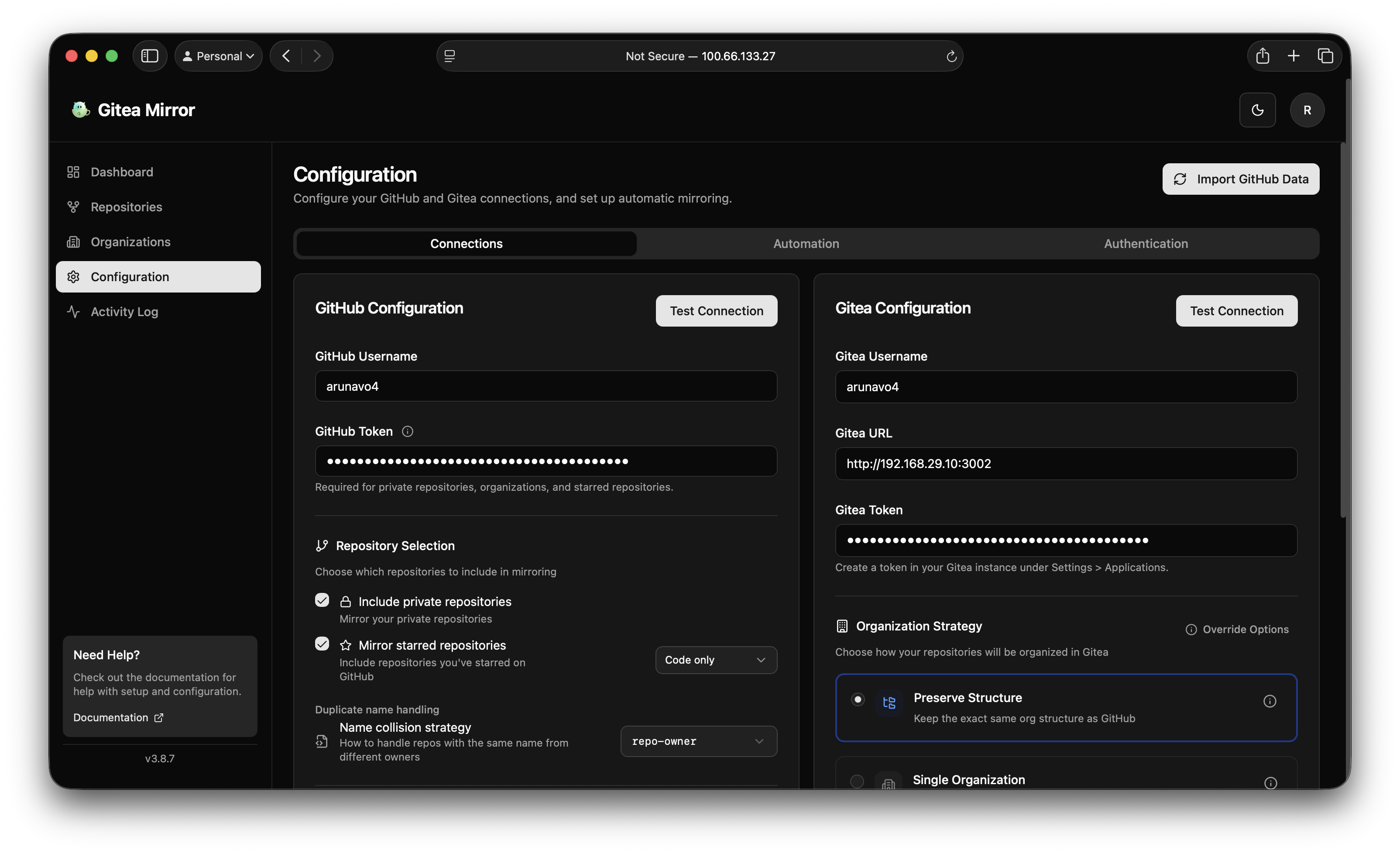
The Configuration page is organized into four tabs.
Connections
This is where the two ends of the mirror are set up. It contains two cards, one per end, and each starts with a dropdown that picks the host.
The source card starts with the Source dropdown: GitHub, GitLab or Gitea / Forgejo. GitHub is the default. The other two carry a BETA pill and show an Instance URL field for self-hosted instances. Below that come the username and personal access token for the selected host, with the scopes the card needs listed next to the token field, and the repository selection options: whether to include private repositories, public repositories, archived repositories, forks, repositories where you are only a collaborator, and starred repositories. The Sources page covers each host.
The destination card starts with the Destination dropdown: Gitea, Forgejo, GitHub or GitLab. Gitea is the default; the other three carry a BETA pill. For Gitea and Forgejo the card holds the server URL, an optional external URL, an access token and the username that acts as default owner. For GitHub and GitLab it holds the instance URL, the account and a token, and a notice explains that those targets are overwritten on every sync. The card also carries the organization settings: the mirror strategy, default organization, organization visibility, and the per-repository mirror interval that Gitea itself uses to re-pull from the source. The Destinations page covers each host.
GitHub to Gitea is the supported path. Every other source and destination is beta: tested end to end against real hosts, with less time in the field.
Both cards have a Test button that performs a live authenticated call, so you can confirm credentials before importing anything.
Locks. Once repositories are imported the source locks, and once anything is mirrored the destination locks. The dropdown and the URL field then show a lock note with a Change button, and changing goes through a confirmation that spells out what happens to the existing repositories. Environment values that disagree with a locked host are ignored on boot with a warning.
If your Gitea instance is reachable at one URL from the Gitea Mirror process and at a different URL from your browser, for example an internal service name versus a public hostname, set the external URL as well. Dashboard links use the external URL while all API and mirroring traffic keeps using the primary URL.
Mirror settings
Below the connection cards, the mirror settings decide what travels with the code: issues, pull requests, labels, milestones, releases, wiki and LFS objects, plus the force push protection strategy. Switches that the current source or destination cannot serve are disabled and say why.
Releases have two numbers under the switch. Latest is how many releases are mirrored per repository, newest first, ten by default. Assets for latest is how many of those get their assets uploaded: leave it empty to upload assets for every mirrored release, set it to 0 for release notes and tags only, or set it to a number to keep assets for the newest N releases while older ones keep their notes and tag. The limit never deletes assets that were already uploaded.
The Remove old release assets switch under them turns that last sentence around. Off, which is the default, a sync only ever uploads. On, every sync also deletes the attachments of each mirrored release ranked past Assets for latest, so lowering the limit actually frees the disk. It is global rather than per repository, it never removes a release or its notes, and a release whose attachments cannot be listed is left alone and retried on the next sync.
The Pre-releases switch under them decides which releases are candidates at all: left on it mirrors every release, turned off it skips everything the source marks as a pre-release. With a filter active the Latest count applies to the releases that match, so ten stable releases are kept even when a project ships betas in between, and releases of the other kind are removed from Gitea on the next sync. A release the destination has no pre-release flag for is left alone. The per organization and per repository Mirror options dialog offers the same choice under its Releases row - All, Stable only, or Inherit, where Inherit means the level above - and the release type is RELEASE_TYPE in the environment.
Custom tag rules… beside that switch opens a dialog with Include tags and Exclude tags, two comma separated pattern lists that catch the projects shipping release candidates without marking them as pre-releases. The same lists sit under the Releases row in the per organization and per repository dialog, where leaving both lists empty means the level above, and in the environment they are RELEASE_INCLUDE_TAGS and RELEASE_EXCLUDE_TAGS.
Opened from a repository, that dialog also lists the releases Gitea already holds for it and crosses out the ones the draft rules would drop on the next sync, so a pattern can be checked before saving. The organization and global dialogs leave the list out because their rules apply to many repositories at once.
Automation
This tab controls scheduled mirroring and cleanup.
Scheduled syncing runs on an interval or a cron schedule. When enabled it re-syncs existing mirrors, and optionally discovers newly created GitHub repositories and mirrors them without any manual action. Two separate switches govern that: auto-import decides whether new repositories are discovered and added to the database, and auto-mirror decides whether they are then actually mirrored to Gitea.
The same tab holds repository cleanup, which handles repositories that have disappeared from the source. The action for an orphaned repository is one of skip, archive, or delete, and archive is the default because it preserves the mirrored data. There is a dry-run mode that logs what would happen without touching anything. The card’s Reconcile with destination button compares a Gitea or Forgejo server with the database and offers to adopt mirrors the app does not know about or reset rows whose mirror is gone. Both are described on the Cleanup and reconcile page.
Notifications
Gitea Mirror can send a notification on sync failure, on sync success, and when a new repository is discovered. Four providers are supported: ntfy, Apprise, Gotify, and a generic webhook. Each has its own settings, and only one provider is active at a time.
The generic webhook sends a JSON POST containing title, message, type, and timestamp fields, which makes it straightforward to wire into anything that accepts an inbound hook.
Authentication
This tab configures how people sign in. Email and password authentication is always available. On top of that you can register OIDC or SSO providers, and enable header authentication for deployments sitting behind a reverse proxy that already handles identity, such as Authentik or Authelia.
Header authentication reads the username, email, and display name from configurable request headers. It can optionally auto-provision accounts on first sight of a new user, restricted to an allowlist of email domains.
The API Keys card on the same tab creates keys for scripts and CI pipelines. A key is sent in the x-api-key header and can call every endpoint the web interface uses. See API and API keys.
Warning: Only enable header authentication when the app is genuinely behind a trusted proxy that strips those headers from inbound client requests. If clients can set the headers themselves, anyone can sign in as anyone.
Mirror strategies
The mirror strategy decides where each repository lands on the destination. There are four, and they are set on the destination card. The examples below say Gitea and organization; on GitLab the equivalent is a group, and the GitHub target uses organizations that must already exist.
preserve
Keeps the same organization structure as the source. A repository at acme/api on GitHub becomes acme/api in Gitea, with the organization created if it does not exist. This is the default and the right choice when you want the mirror to be recognizable to anyone who knows the source side.
single-org
Consolidates every repository into one Gitea organization, regardless of where it came from on the source. The target organization defaults to github-mirrors. Useful when you want all mirrored content in one clearly separated namespace.
flat-user
Places every repository directly under your Gitea user account, with no organizations involved. The simplest layout, and a reasonable fit for a personal instance with a modest number of repositories.
mixed
Splits the difference. Your personal repositories go into a single named organization, while repositories owned by organizations on the source preserve their original structure. This keeps organization repositories where people expect them while corralling your personal ones.
Note: Repositories mirrored because you starred them are handled separately from the strategy above. They can either go into a dedicated organization, which is named
starredby default, or preserve their original owner’s path. When two starred repositories from different owners share a name, a duplicate strategy setting decides whether the name gets a suffix, a prefix, or is placed in an owner-named organization.
Schedule intervals
Anywhere Gitea Mirror asks for an interval, it accepts several formats:
- A duration string with a unit:
30m,8h,7d. The recognized units arems,s,m,h,d, andw, and both short and long spellings work, so8hand8 hoursare equivalent. - A five-field cron expression:
0 2 * * *for daily at 2 AM,0 */6 * * *for every six hours,0 0 * * 0for weekly on Sunday at midnight. - A plain number, interpreted as seconds.
3600means one hour.
Cron expressions are useful when you want syncing to happen during a specific low-traffic window rather than at a fixed offset from whenever the service last restarted.
Configuring through environment variables
Environment variables serve two distinct purposes, and it is worth keeping them apart.
The first group is read directly by the running process at startup and has no equivalent in the UI: the port, the host, the session secret, the encryption secret, and the public URLs. These must be set as environment variables.
The second group seeds the database configuration. On startup, if any of GITHUB_USERNAME, GITHUB_TOKEN, GITEA_URL, GITEA_USERNAME, or GITEA_TOKEN is set, Gitea Mirror loads the whole environment configuration and writes it into the first user’s config row. If no user exists yet, it does nothing and tries again on the next start.
Note: Values written from the environment overwrite the corresponding fields in the database on every start. If you set
GITEA_ORGANIZATIONin your compose file and then change the organization through the UI, the next restart puts the environment value back. Either manage a setting through the UI or through the environment, not both.
Tokens supplied through the environment are encrypted with AES-256-GCM before they are stored, the same as tokens entered through the UI.
The source and destination hosts are seeded the same way: SOURCE_PROVIDER and SOURCE_URL pick the source, DESTINATION_PROVIDER picks the destination, and the GITHUB_* and GITEA_* names keep working for every host. A value that disagrees with a locked host is ignored with a warning rather than applied.
Core environment variables
These are the ones that matter for nearly every deployment. The environment variables reference has the complete list.
Server
| Variable | Default | Description |
|---|---|---|
NODE_ENV |
development |
Runtime environment. The container image sets production. |
HOST |
localhost |
Interface to bind. The container image sets 0.0.0.0. |
PORT |
4321 |
Port to listen on. |
BASE_URL |
/ |
Path prefix when the app is served under a subpath, for example /mirror. |
DATABASE_URL |
sqlite://data/gitea-mirror.db |
SQLite database location. The container image sets file:data/gitea-mirror.db. |
Note:
DATABASE_URLaccepts thesqlite://scheme, the legacyfile:scheme, or a plain path. Relative paths resolve against the process working directory and the parent directory is created if it is missing. Point it at a mounted volume to relocate the database.
Authentication and secrets
| Variable | Default | Description |
|---|---|---|
BETTER_AUTH_SECRET |
none | Signs session cookies. Generate with openssl rand -base64 32. Required. |
BETTER_AUTH_URL |
http://localhost:4321 |
The origin the auth server runs on. Scheme and host only, no path. |
PUBLIC_BETTER_AUTH_URL |
none | The origin the browser should send auth requests to. Set this when the app is reachable at more than one origin. Scheme and host only. |
BETTER_AUTH_TRUSTED_ORIGINS |
none | Comma-separated list of additional origins allowed to make auth requests. |
ENCRYPTION_SECRET |
none | Key for AES-256-GCM encryption of stored GitHub and Gitea tokens. Generate with openssl rand -base64 48. |
BETTER_AUTH_SECRET and ENCRYPTION_SECRET are both auto-generated by the Docker entrypoint if you leave them unset, and persisted inside the data volume so they survive restarts. Outside Docker there is no such fallback, and a missing BETTER_AUTH_SECRET in production logs a security warning and uses a known insecure development value.
The origin of BETTER_AUTH_URL is trusted automatically, so BETTER_AUTH_TRUSTED_ORIGINS is only for additional origins. Common reasons to add one: reaching the app by local IP as well as by domain name, an external SSO provider, or a reverse proxy on a different hostname.
Multiple access URLs
To reach the app at both a local IP and a public domain:
BETTER_AUTH_URL=https://gitea-mirror.example.com
PUBLIC_BETTER_AUTH_URL=https://gitea-mirror.example.com
BETTER_AUTH_TRUSTED_ORIGINS=http://10.10.20.45:4321,http://192.168.1.100:4321
Browsers isolate cookies per origin, so you will need to sign in separately on each origin. That is a browser security rule, not something the application can work around.
Path prefix deployments
To serve the app at https://git.example.com/mirror:
BASE_URL=/mirror
BETTER_AUTH_URL=https://git.example.com
PUBLIC_BETTER_AUTH_URL=https://git.example.com
BETTER_AUTH_TRUSTED_ORIGINS=https://git.example.com
The auth variables stay as bare origins. The prefix comes from BASE_URL and is applied when auth endpoints are built, so they resolve to https://git.example.com/mirror/api/auth/*. Any path accidentally included in the auth URLs is stripped. BASE_URL is read at runtime rather than baked in at build time, so the same prebuilt image works under any prefix.
Example: fully declared deployment
A compose file that comes up ready to mirror, with no UI interaction required:
services:
  gitea-mirror:
    image: ghcr.io/raylabshq/gitea-mirror:latest
    container_name: gitea-mirror
    restart: unless-stopped
    ports:
      - "4321:4321"
    volumes:
      - ./data:/app/data
    environment:
      - NODE_ENV=production
      - HOST=0.0.0.0
      - PORT=4321
      - BETTER_AUTH_SECRET=${BETTER_AUTH_SECRET}
      - BETTER_AUTH_URL=https://gitea-mirror.example.com
      - PUBLIC_BETTER_AUTH_URL=https://gitea-mirror.example.com
      - BETTER_AUTH_TRUSTED_ORIGINS=https://gitea-mirror.example.com
      - ENCRYPTION_SECRET=${ENCRYPTION_SECRET}

      - GITHUB_USERNAME=your-username
      - GITHUB_TOKEN=${GITHUB_TOKEN}
      - PRIVATE_REPOSITORIES=true
      - MIRROR_STARRED=true

      - GITEA_URL=https://gitea.example.com
      - GITEA_USERNAME=admin
      - GITEA_TOKEN=${GITEA_TOKEN}
      - MIRROR_STRATEGY=preserve

      - MIRROR_METADATA=true
      - MIRROR_ISSUES=true
      - MIRROR_RELEASES=true

      - SCHEDULE_ENABLED=true
      - SCHEDULE_INTERVAL=8h
      - AUTO_IMPORT_REPOS=true
      - AUTO_MIRROR_REPOS=true
Remember that the configuration is only written once an admin account exists. Sign up first, then restart the container, or simply let the next scheduled restart pick it up.